Sway
Sway is a reimagining of i3wm (X11), rewritten for Wayland. Sway (like i3wm) is a keyboard centric tiling window manager. Although not a source fork of i3wm, the configuration and user interface of Sway is almost identical to that of i3wm.
Sway Config
The Fedora Atomic Sway edition includes a default configuration for Sway. It’s pretty nice out of the box, and so if you like it, you can just use it. However, I use my own custom configuration that I replace it with, and you can do the same if you like.
Open the default terminal emulator (foot) with the keyboard shortcut:
Win+Enter (hold down the “Windows” key on your keyboard, then
simultaneously press Enter.)
Install Nix
First, enable transient root (required for Nix on rpm-ostree systems):
sudo tee /etc/ostree/prepare-root.conf <<'EOF'
[composefs]
enabled = yes
[root]
transient = true
EOF
Track the config in initramfs and reboot:
sudo rpm-ostree initramfs-etc --track=/etc/ostree/prepare-root.conf
sudo systemctl reboot
After reboot, install Nix using the Determinate Systems installer:
curl --proto '=https' --tlsv1.2 -sSf -L https://install.determinate.systems/nix | \
  sh -s -- install ostree --no-confirm
Restart your terminal session, then verify installation:
nix --version
Install Home Manager
Clone my customized sway config repository:
git clone https://github.com/enigmacurry/sway-home \
  ~/git/vendor/enigmacurry/sway-home
Install the configuration using Home Manager:
cd ~/git/vendor/enigmacurry/sway-home
just hm-install
This will install all dotfiles, packages (including Emacs), and shell
configuration. Any existing files that conflict will be backed up with
a .backup suffix.
During installation, you will be prompted to enter your git user name
and email if not already configured. This creates a local config file
at ~/.config/git/config.local which is not tracked by the
repository, allowing each user to have their own identity.
Once installation completes, press Win+Shift+E and choose Log Out.
Log back in, and this will load the new config files.
Setup display resolutions and orientation
Fedora Sway Atomic ships with kanshi for display setup. Kanshi does not include any GUI for setting it up, so another program called wdisplays is useful.
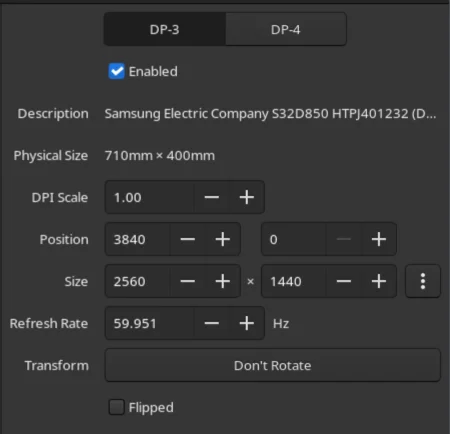
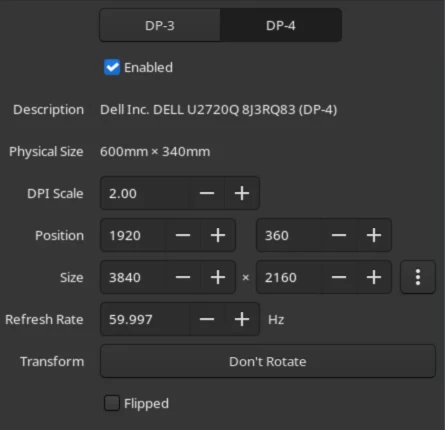
You can configure all of your displays using the wdisplays GUI program, however, the configuration will not persist across login sessions. So what you need to do is set it up how you like it, and then transfer that information into the Kanshi config file so that it sets it up the same way everytime you login.
For example, on my test system I have two display port monitors, with
outputs named DP-3 and DP-4. These are shown in wdisplays and I
have set up the size, position, and DPI scaling exactly how I like it:
DP-3:
DP-4:
Open the Kanshi config file ~/.config/kanshi/config and copy the
information into the config file:
profile {
   output DP-3 enable mode 2560x1440 position 3840,0 scale 1 transform normal
   output DP-4 enable mode 3840x2160 position 1920,360 scale 2 transform normal
}
Check out man 5 kanshi for more config options. Kanshi is
automatically started when sway is, so you can test it by logging out
and logging back in.